 Skip to content
Quick answer
To complete a Daman login, open the login screen, choose the phone number tab (with the +91 code) or the Email Login tab, enter the password you set at registration and tap Log in.
The Daman login screen is short: two tabs, two fields and one button. Most failed sign-ins come from small details such as a missing country code, an email typed on the wrong tab or an old password saved in the browser. This guide covers each part of the screen so you can get in on the first try.
If you are new here, the Daman Game login hub gives an overview of the whole platform before you create an account.
What is the Daman login screen?
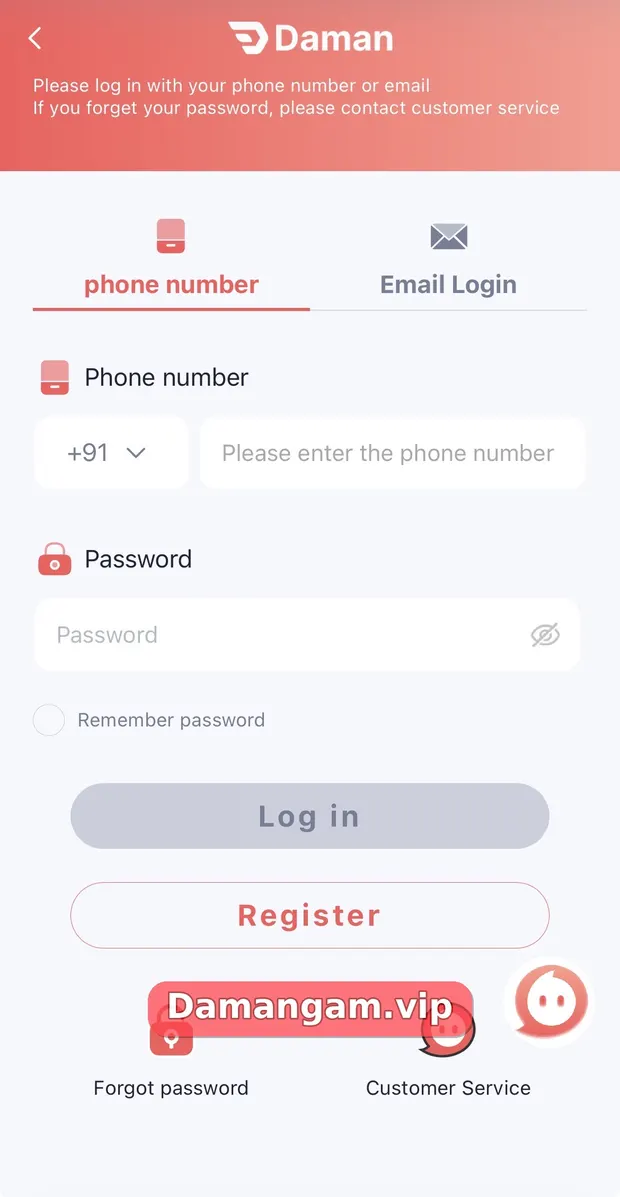
The Daman login screen is the sign-in page of the Daman gaming app and website. Its header reads “Please log in with your phone number or email” and adds that you should contact customer service if you forget your password. Below that sit the phone number and Email Login tabs, a password field with a show/hide eye icon, a Remember password option, and the Log in and Register buttons.
Who is this login guide for?
- Players who already registered and want to sign in on a phone, tablet or computer.
- Anyone who registered with a phone number but is trying the Email Login tab by mistake.
- Users who see an error after the platform notice about a website upgrade and clearing the browser cache.
- Family members helping an adult player sign in safely without sharing an OTP.
How do I log in to Daman with my phone number?
Use the phone number tab, keep +91 selected and type your 10-digit mobile number without a leading zero.
- Open the Daman login page from the Log in button on this site.
- Stay on the phone number tab, which is selected by default.
- Check that the country code shows +91 and enter your 10-digit mobile number.
- Type the password you created at registration. Tap the eye icon to check it for typos.
- Tick Remember password only on a personal device that nobody else uses.
- Tap Log in. Your account page then shows your UID, VIP level and total balance.
How do I use the Daman Email Login tab?
Tap Email Login next to the phone tab if your account is linked to an email address. Enter the full address, including the domain, and the same password you use for the account. If you registered only with a phone number, the email tab will not recognise you, so switch back to the phone tab.
| Login tab | What you enter | Best for |
|---|---|---|
| Phone number | +91 code and 10-digit mobile number, then password | Most players, since registration uses a phone number |
| Email Login | Full email address, then password | Accounts that have an email linked |
Why is my Daman login not working?
The button stays grey until both fields are filled, so an empty field is the first thing to check. Other common causes are listed below.
- Wrong tab: an email typed into the phone tab, or the reverse.
- Country code: the number must sit after +91, not with 0 or +91 typed again.
- Saved password: your browser may autofill an old password. Clear the field and type it again.
- Cached site: the in-app notice says to clear the browser cache after the website upgrade before logging in.
- Forgotten password: use the Forgot password link or our Daman password reset guide.
Is it safe to tick Remember password?
Remember password saves your details on that device, so anyone holding your phone can open your wallet. Use it only on a personal, locked device. Never share your password, OTP or UPI PIN with anyone, including people who say they are agents, teachers or support staff in private chats.
What happens after a successful Daman login?
You land on the home lobby with the bottom menu active. The Account tab now shows your member name, UID, VIP badge and the exact date and time of this login. Take ten seconds to check those details each time; it is the fastest way to notice if someone else has been using your account.
- Check that the balance matches what you expect.
- Read the scrolling notice bar for maintenance or address changes.
- Open Activity only if you plan to claim a reward you understand.
Daman terms used in this guide
- UID
- Your unique Daman account number, shown under your name on the Account tab.
- Email Login
- The second tab on the login screen for accounts linked to an email address.
- Remember password
- An option that saves your login on the device.
- Self Service Center
- The in-app help desk for requests such as Change Login Password.
Frequently asked questions
Can I log in to Daman with my email?
Yes, the login screen has an Email Login tab. It works only when an email is linked to your account. Most accounts are created with a phone number, so use the phone tab if email sign-in fails.
Do I need the +91 code for Daman login?
The +91 code is pre-selected on the phone tab. Enter only your 10-digit mobile number after it, without a leading zero or a second country code.
Why is the Log in button grey?
The button stays inactive until both the phone number (or email) and the password fields contain text. Fill both fields and it becomes active.
What should I do if I forget my Daman password?
Tap Forgot password on the login screen. The screen also tells you to contact customer service if you forget your password, and the Self Service Center lists a Change Login Password option.
Can I stay logged in on two phones?
The app does not publish a device limit on the login screen. For safety, sign out on shared or old devices and keep Remember password off on them.
Is the Daman login free?
Yes. Signing in does not cost anything. Money is only involved when you choose to deposit into the wallet.
Key takeaways
- Daman login supports two tabs: phone number (+91) and Email Login.
- Use the same password you set when you registered.
- Clear the browser cache if the site was recently upgraded and login fails.
- Turn on Remember password only on a private, locked device.
Related Daman guides
Ready to open Daman Game?
Log in to your account or register with invite code 3562222125196. Adults 18+ only; play within your limits.
For adults 18+ only. Real-money games involve financial risk and outcomes are never guaranteed. Rules may differ by Indian state, so check your local law before you play. Features, limits and offers can change inside the app at any time.
