 Skip to content
Quick answer
Daman customer service runs through the Self Service Center: choose a request type such as Deposit Not Received, Withdrawal Problem or Change Login Password, submit it, then tap Progress Query to see the result. Online service offers live help.
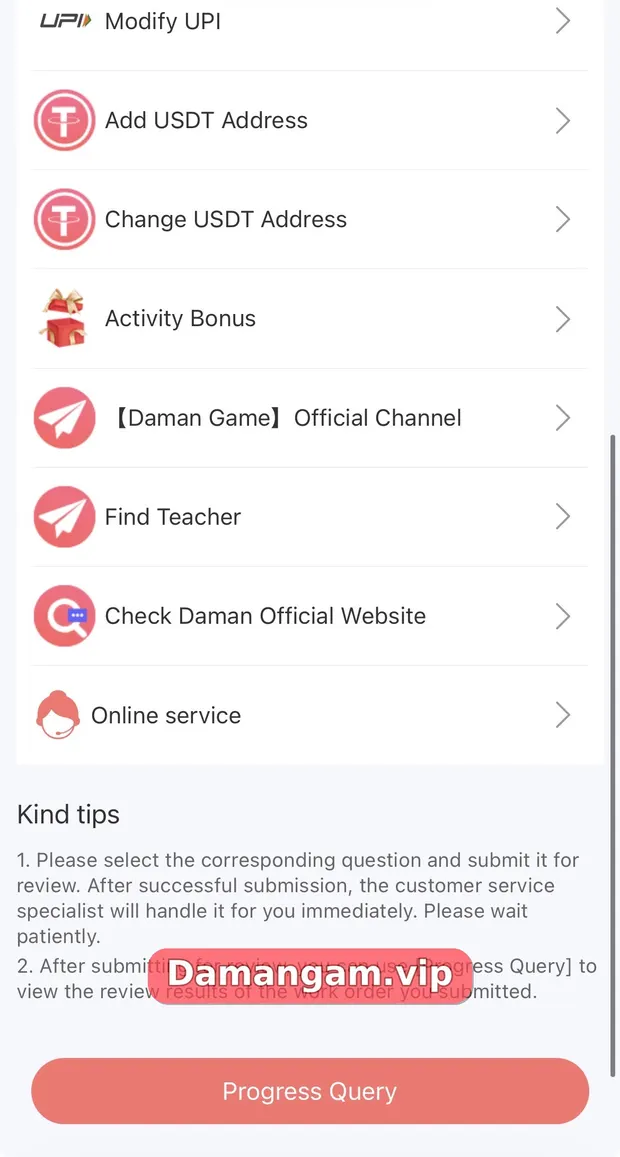
The Self Service Center opens with “Welcome to the Self Service Customer Service Center” and an EN language option. Its Kind tips explain that after you submit a question, a customer service specialist handles it, and Progress Query shows the review result.
All other help guides are linked from the Daman games login home page.
What is the Daman Self Service Center?
The Daman Self Service Center is the in-app help desk. It lists common request types, accepts a form for each, and lets you follow the review through Progress Query.
Who is this for?
- Players with deposit, withdrawal or password issues.
- Users updating bank, UPI or USDT details.
Which options are in the Self Service Center?
| Option | Use it for |
|---|---|
| Deposit Not Received | Payments that did not reach your balance |
| Withdrawal Problem | Pending or returned withdrawals |
| Change Login Password | Resetting your password |
| IFSC Modification / Change bank name / Modify Bank Information | Fixing bank details |
| Modify UPI | Updating your UPI ID |
| Add / Change USDT Address | Managing crypto withdrawal addresses |
| Activity Bonus | Questions about rewards |
| [Daman Game] Official Channel | The platform’s channel |
| Find Teacher | A listed option; be careful with anyone offering paid predictions |
| Check Daman Official Website | Verifying the current address |
| Online service | Live chat with support |
How do I submit a support request?
- Tap the round chat icon or open Customer Service from the login page.
- Choose the option that matches your issue.
- Fill in the form and attach screenshots.
- Submit and wait for the specialist to review it.
- Tap Progress Query to see the result.
How do I stay safe when contacting support?
- Use only the in-app service options.
- Share your UID if asked, never your password, OTP or UPI PIN.
- Ignore people who message you first claiming to be support.
- Be wary of anyone selling “teacher” predictions; results are random.
What makes a support request get resolved faster?
Clear, complete requests are easier to handle. Choose the right category, include amounts, dates and reference numbers, attach readable screenshots and submit once. Multiple duplicate requests can slow things down.
- Right category.
- Amounts, dates and reference numbers.
- One request per issue.
Daman terms used in this guide
- Self Service Center
- The in-app help desk with request types.
- Progress Query
- Shows the review result of a submitted request.
- Online service
- Live chat support inside the app.
- Find Teacher
- A listed option; treat paid predictions with suspicion.
Frequently asked questions
How do I contact Daman customer service?
Use the chat icon or Customer Service link to open the Self Service Center and Online service.
What is Progress Query?
A button that shows the review status of requests you submitted.
Can I change my bank details?
Yes, using IFSC Modification, Change bank name or Modify Bank Information.
What is Find Teacher?
An option in the service list. Treat paid prediction “teachers” with suspicion; results cannot be predicted.
Is Daman support available in Hindi?
The Self Service Center shows an EN language selector; other languages may be available there.
Will support ask for my OTP?
Genuine support should not. Never share it.
Key takeaways
- Self Service Center covers most issues.
- Track every request with Progress Query.
- Share UID, never passwords or OTPs.
- Be cautious with “teachers”.
Related Daman guides
Ready to open Daman Game?
Log in to your account or register with invite code 3562222125196. Adults 18+ only; play within your limits.
For adults 18+ only. Real-money games involve financial risk and outcomes are never guaranteed. Rules may differ by Indian state, so check your local law before you play. Features, limits and offers can change inside the app at any time.
