 Skip to content
Quick answer
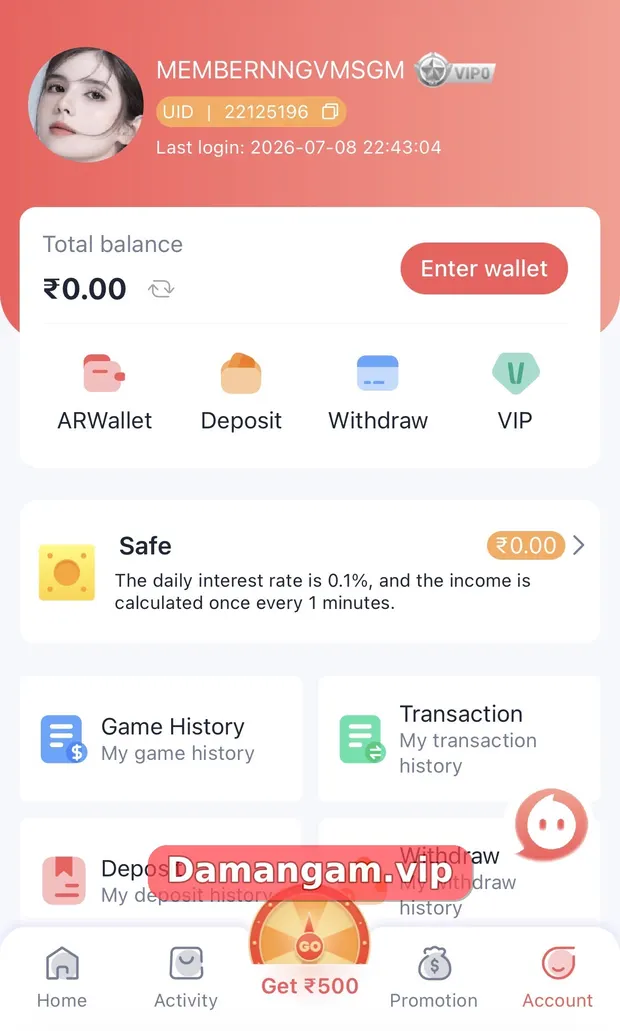
Daman app login works the same as the website: open the app or shortcut, choose the phone or email tab, enter your password and tap Log in. The Account tab then shows your UID, last login time, balance and VIP level.
Whether you use an installed Daman app or the Add to Desktop shortcut, the login screen is identical to the web version. The difference is what happens after you sign in: the bottom menu gives you Home, Activity, a “Get ₹500” wheel button, Promotion and Account.
Many players search for Daman game login help when the real question is how to find something inside the app after signing in. This page covers both.
What is the Daman app login?
The Daman app login is the sign-in step inside the Daman mobile app or web shortcut. It uses your registered phone number or email plus your password, and it opens your personal Account area with wallet tools, game history and transaction records.
Who is this page for?
- Players who installed the app or added the shortcut and want to sign in.
- Users who want to know what the Account tab numbers mean.
- People checking whether their last login time looks right for security.
How do I log in to the Daman app?
- Open the Daman app or the Daman icon on your home screen.
- Tap Account in the bottom menu, or the Log in button on the home page.
- Choose the phone number or Email Login tab and fill in your details.
- Enter your password and tap Log in.
- Check the Last login time on the Account tab to confirm it was you.
What does the Account tab show after app login?
The Account tab is the control centre of your Daman account. Here is what each part does.
| Item | What it shows or does |
|---|---|
| Member name and UID | Your account name and unique ID. Support may ask for the UID, never your password. |
| VIP badge | Your current VIP level, for example VIP0 for a new account. |
| Last login | Date and time of the latest sign-in, useful for spotting unknown access. |
| Total balance | Wallet balance in rupees, with a refresh icon. |
| ARWallet, Deposit, Withdraw, VIP | Shortcuts to wallet tools and the VIP page. |
| Safe | A savings-style area. The screen says the daily interest rate is 0.1%, calculated every minute. |
| Game History, Transaction, Deposit and Withdraw history | Records you can check before contacting support. |
How can I tell if someone else logged in to my Daman app?
Compare the Last login time on the Account tab with when you actually signed in. If it does not match, change your password straight away through the Self Service Center option “Change Login Password” and review your withdrawal records.
Why does the app log me out?
Sessions can end after an update, after you clear app data or when you sign in on another device. Log in again with the same details. If it keeps happening, clear the cache and update to the newest version from a trusted link.
Which app settings should I review after logging in?
Beyond the login itself, a few settings make the app safer to use every day. Review them once and revisit them after updates.
- Notifications: allow them only if you find them useful, not as a nudge to play more.
- Linked payment details: confirm the bank and UPI entries are yours.
- Safe balance: understand that it is a platform feature, not a bank account.
- Histories: bookmark Game History and Transaction history for quick checks.
Daman terms used in this guide
- Remember password
- An option that saves your login on the device.
- Self Service Center
- The in-app help desk for requests such as Change Login Password.
- Progress Query
- The button that shows the status of a support request.
- Last login
- The date and time of your most recent sign-in, shown on the Account tab.
Frequently asked questions
Is the Daman app login different from the website login?
No. Both use the same phone number or email and password, and both open the same account.
Where is the login button in the Daman app?
Tap Account in the bottom menu or the Log in button at the top of the home page.
What is my Daman UID?
The UID is your unique account number shown under your name on the Account tab. You can share it with support; never share your password.
What does VIP0 mean?
VIP0 is the starting VIP level shown on new accounts. Levels and their benefits are explained on the VIP page inside the app.
How do I check my login history?
The Account tab shows your last login date and time. Contact customer service if it shows activity you do not recognise.
Can I use fingerprint login on Daman?
The login screen shows phone, email and password fields only. Use your phone lock screen for extra protection.
Key takeaways
- App login uses the same details as the website.
- The Account tab shows UID, VIP level, last login time and total balance.
- Check Last login regularly to spot unknown access.
- Change your password at once if anything looks wrong.
Related Daman guides
Ready to open Daman Game?
Log in to your account or register with invite code 3562222125196. Adults 18+ only; play within your limits.
For adults 18+ only. Real-money games involve financial risk and outcomes are never guaranteed. Rules may differ by Indian state, so check your local law before you play. Features, limits and offers can change inside the app at any time.
