 Skip to content
Quick answer
AR Wallet is described in the Daman app as a third-party payment service that uses ARB (digital currency) for fast payments. ARPay appears as a deposit and withdrawal option. You must tap Activate on the AR Wallet panel before using it.
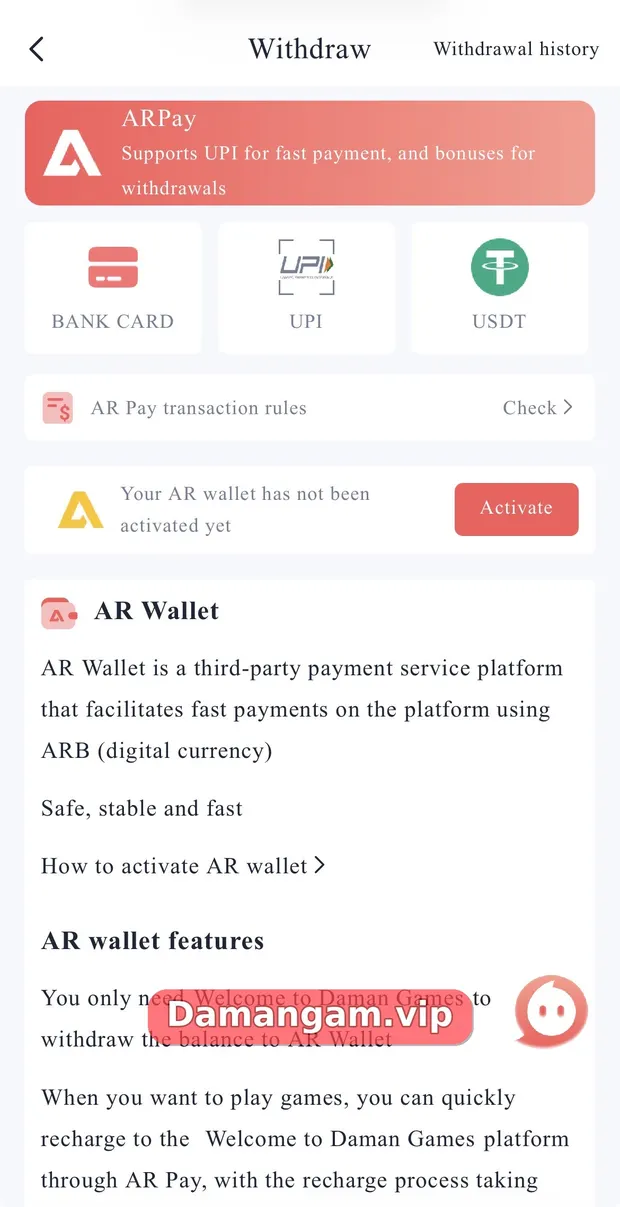
The Daman withdraw screen promotes ARPay with the line “Supports UPI for fast payment, and bonuses for withdrawals”. Below it, an AR Wallet panel explains the service and offers “How to activate AR wallet”.
Because AR Wallet is a separate third-party service, read its own terms carefully. For ordinary methods, see the Daman withdrawal guide or the Daman Game home page.
What is Daman AR Wallet?
According to the in-app description, AR Wallet is “a third-party payment service platform that facilitates fast payments on the platform using ARB (digital currency)”. ARPay is the payment option that connects Daman to that wallet.
Who might use AR Wallet?
- Players who want an alternative to bank and UPI withdrawals.
- Users comfortable with third-party wallets and digital currency.
How do I activate the Daman AR Wallet?
- Open Account > Withdraw or tap ARWallet on the Account tab.
- Find the panel that says “Your AR wallet has not been activated yet”.
- Tap Activate and read “How to activate AR wallet”.
- Complete the steps shown and confirm activation.
- Check AR Pay transaction rules before your first transfer.
What does the app say AR Wallet does?
- Lets you withdraw your Daman balance to the AR Wallet.
- Lets you recharge the Daman platform quickly through AR Pay.
- Is described on screen as “Safe, stable and fast”. This is the platform’s own description.
What should I consider before using AR Wallet?
| Question | Why it matters |
|---|---|
| Who runs the wallet? | It is a third party, separate from your bank |
| How is ARB valued? | Digital currency values and conversion rules affect what you receive |
| What are the transaction rules? | Tap “AR Pay transaction rules > Check” to read them |
| Can I move funds to my bank? | Check the wallet’s own withdrawal process |
Should beginners use AR Wallet?
Beginners usually do better with familiar methods like UPI or bank transfer, because those are easier to trace with your own bank if something goes wrong. Consider AR Wallet only after you understand its rules, conversion and how to move funds back to your bank.
- Start with UPI or bank.
- Read AR Pay transaction rules first.
- Understand how to exit to your bank.
Daman terms used in this guide
- Beneficiary
- The bank account, UPI ID or address that receives a withdrawal.
- IFSC
- The bank branch code needed for bank withdrawals.
- USDT-TRC20
- The Tether stablecoin on the TRON network.
- ARPay
- The payment option linked to the third-party AR Wallet.
Frequently asked questions
What is ARPay on Daman?
A deposit and withdrawal option linked to AR Wallet, a third-party payment service.
What is ARB?
The app describes ARB as the digital currency used by AR Wallet.
Do I need AR Wallet to withdraw?
No. Bank Card, UPI and USDT are also listed.
How do I activate AR Wallet?
Tap Activate on the AR Wallet panel and follow the steps.
Does ARPay give a bonus?
The screen mentions bonuses for withdrawals and showed +3% on the ARPay deposit tile. Terms can change.
Is AR Wallet a bank?
No. It is a third-party payment service, not a bank account.
Key takeaways
- AR Wallet is a third-party service using ARB.
- Activate it before use.
- Read AR Pay transaction rules.
- Bank, UPI and USDT remain alternatives.
Related Daman guides
Ready to open Daman Game?
Log in to your account or register with invite code 3562222125196. Adults 18+ only; play within your limits.
For adults 18+ only. Real-money games involve financial risk and outcomes are never guaranteed. Rules may differ by Indian state, so check your local law before you play. Features, limits and offers can change inside the app at any time.
