 Skip to content
Quick answer
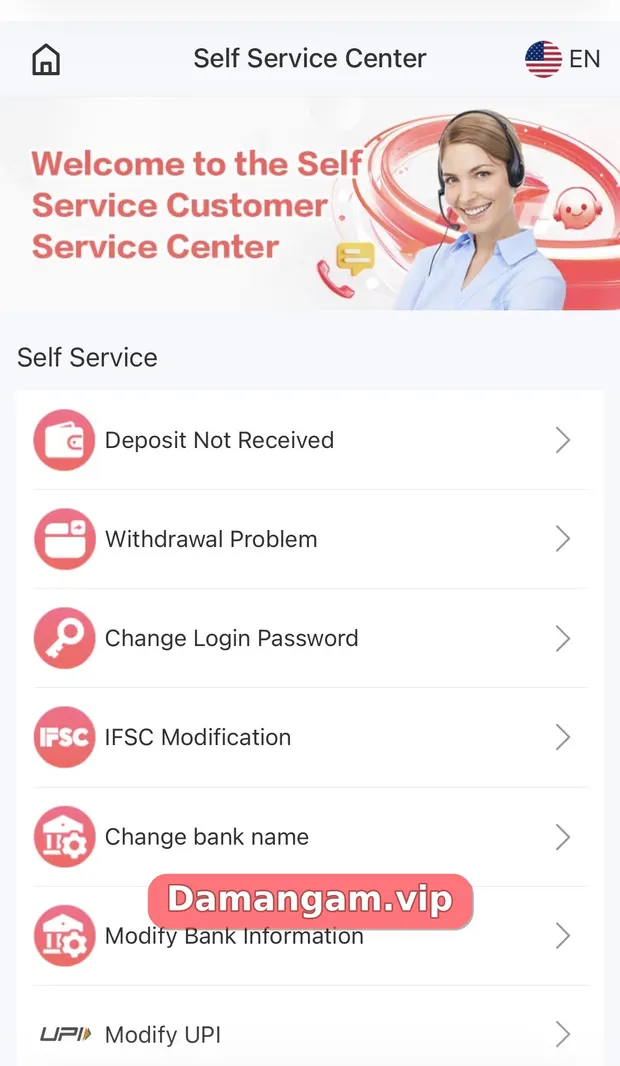
If a Daman deposit is not received, check Deposit history first, then open Customer Service > Self Service Center > Deposit Not Received, submit your payment screenshot and UTR or reference number, and track it with Progress Query.
A deposit can be delayed when the payment network is slow or when the payment reference does not match. “Deposit Not Received” is the first option in the Self Service Center, which shows how common this is.
Back to the Daman Game Login home page for other guides.
What does Deposit Not Received mean?
Deposit Not Received is a Self Service request type for payments that left your bank or wallet but did not appear in your Daman balance.
Who is this for?
- Players whose UPI payment succeeded but balance did not update.
- Users who paid through USDT or ARPay and see nothing yet.
How do I report a missing Daman deposit?
- Open Deposit history and check the status of the payment.
- Find the UTR or reference number in your UPI or bank app.
- Take a clear screenshot of the successful payment.
- Open Customer Service > Self Service Center > Deposit Not Received.
- Submit the details and screenshot.
- Tap Progress Query to follow the review.
What proof should I include?
| Proof | Where to find it |
|---|---|
| UTR / reference number | UPI app transaction details |
| Payment screenshot | UPI, Paytm or bank app |
| Amount and time | Bank SMS or app |
| Channel used | Deposit history (for example Phonepe_QR) |
How do I avoid deposit problems next time?
- Pay exactly the amount you selected.
- Complete payment before the deposit page times out.
- Use the channel shown on screen, not a number from a chat.
What should I not do while waiting?
Do not send the same payment again, do not contact numbers posted in comments or groups, and do not share your UPI PIN with anyone offering to “speed it up”. Wait for the Progress Query result and keep your proof safe.
- Do not repeat the payment.
- Do not trust unofficial contacts.
- Do not share your UPI PIN.
Daman terms used in this guide
- IFSC
- The bank branch code needed for bank withdrawals.
- USDT-TRC20
- The Tether stablecoin on the TRON network.
- ARPay
- The payment option linked to the third-party AR Wallet.
- UTR
- Unique Transaction Reference number for a UPI or bank payment.
Frequently asked questions
Why is my Daman deposit not showing?
Network delays or a reference mismatch are common causes. Check Deposit history, then submit Deposit Not Received.
What is a UTR number?
A Unique Transaction Reference shown in your UPI or bank app for each payment.
How long does a deposit review take?
The app does not publish a fixed time. Track it with Progress Query.
Should I pay again?
No. Wait for the first payment to be resolved.
Can I contact a Telegram agent instead?
Use the in-app service options. The home notice says to contact Daman only through its own channels.
What if my bank deducted money twice?
Include both references in your request and contact your bank as well.
Key takeaways
- Check Deposit history first.
- Collect the UTR and a screenshot.
- Submit Deposit Not Received in Self Service.
- Track with Progress Query; do not pay twice.
Related Daman guides
Ready to open Daman Game?
Log in to your account or register with invite code 3562222125196. Adults 18+ only; play within your limits.
For adults 18+ only. Real-money games involve financial risk and outcomes are never guaranteed. Rules may differ by Indian state, so check your local law before you play. Features, limits and offers can change inside the app at any time.
